How to Spot AI-Generated Videos on Social Media
Key insights
- AI video's 10-15 second technical ceiling is a temporary weakness. Learning to spot fakes now builds habits that transfer even after the technology improves.
- Real footage looks imperfect: compression artifacts, shaky framing, and noise. 'Too perfect' is the new red flag, inverting our instinct to trust high-quality video.
- The 3 Cs framework (Common sense, Context, Cross-check) targets the distribution, not the content, making it useful regardless of how realistic AI video becomes.
This is an AI-generated summary. The source video may include demos, visuals and additional context.
In Brief
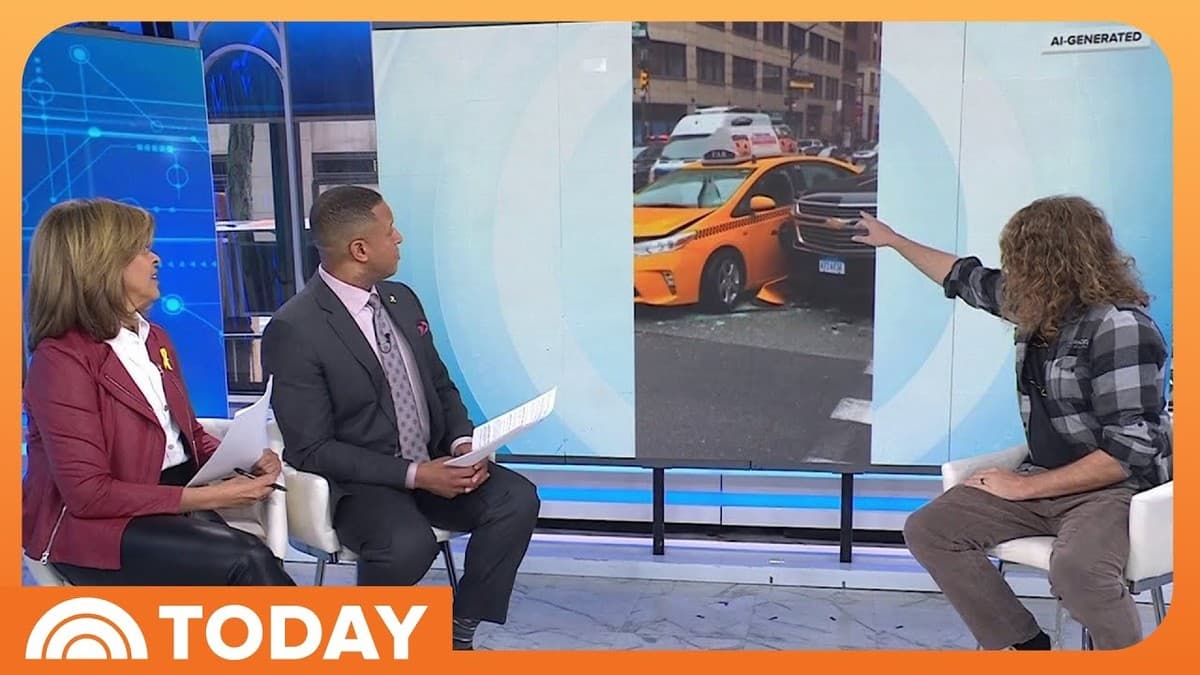
AI-generated videos are flooding social media feeds on Instagram, Facebook, TikTok, and X. Built with tools from Meta, Google, and OpenAI, these clips range from harmless animal videos to fake celebrity endorsements and fabricated news footage. In this TODAY segment, NBC correspondent Vicky Nguyen reports on the rise of "AI slop," while Corridor Digital co-founder Niko Pueringer shares five practical ways to tell what is real and what is not. AI slop is low-quality AI-generated content that clutters your feed. Corridor Digital is a production studio with over 7 million YouTube subscribers, and their video teaching moms to spot AI fakes has racked up 2.3 million views.
Related reading:
What you'll learn
- How to quickly evaluate whether a social media video is AI-generated or real
- Five specific visual and contextual tells that work right now
- A simple three-part framework for verifying any suspicious content you encounter online
Five ways to spot AI-generated video
Step 1: Check the video length
This is Pueringer's number-one tell. If a video is 10 or 15 seconds long, "it's a great indication that it's not real". The reason is computational: making AI videos takes enormous computing resources, and even the most powerful machines available today struggle to generate much beyond 15 seconds in a single clip. A 30-second unbroken shot is far more likely to be genuine footage.
Can longer AI videos exist? Yes. Just as a visual effects artist can stitch together shorter clips, someone could edit multiple AI-generated segments into a longer video. But that takes deliberate effort and skill, which filters out the vast majority of AI slop flooding your feed.
Step 2: Watch the details (especially background people)
AI struggles with consistency over time. Pueringer recommends picking out people in the background and following them through the shot. You will see them "do things that don't make any sense, they will walk into traffic", change direction for no reason, or simply vanish mid-frame.
Other details to watch for:
- Text errors. In one example, a sign reads "TAX" instead of "TAXI." AI often produces text that is almost right but not quite.
- Architectural nonsense. Doors that open to blank walls, windows placed directly in front of concrete. Pueringer describes this as "the appearance of reality but it isn't reality".
- People appearing from nowhere. A figure might look like a police officer for a moment, then simply materialize in the scene with no logical entry point.
Step 3: Evaluate the video quality
This tip inverts your instincts. Real phone footage looks messy. When someone records a video on their phone and it gets re-uploaded across platforms, you see compression artifacts (the blocky, blurry patches that appear when video is compressed and shared multiple times), shaky framing, and noise. AI-generated video does not have any of that. It is a "statistical amalgamation" of training data, so it produces clean, perfectly framed, perfectly lit shots.
If a video looks too polished for the context it claims to show, ask yourself whether real footage would actually look this good. A perfectly centered subject in a supposedly candid street video is a giveaway.
Step 4: Apply the 3 Cs (Common sense, Context, Cross-check)
Pueringer's final general tip is a framework that works even as AI improves:
- Common sense. What are you being shown? Is someone trying to get money from you or push you toward an action? If it seems too dramatic, too heartwarming, or too outrageous, pause before sharing.
- Context. Where did this video come from? A random clip that appeared in your feed deserves more skepticism than something from a source you already trust.
- Cross-check. Is there a second angle? If a major event happened, other cameras would have captured it too. A single, perfectly framed clip with no corroborating footage should raise questions.
Step 5: Use the Adam's apple test for deepfakes
Deepfakes are videos where AI manipulates someone's face to make them appear to say things they never said. For these specifically, Pueringer shares a lesser-known tell: watch the Adam's apple. Deepfake software manipulates the face but does not manipulate the body. If the Adam's apple does not bob and move in sync with the speech, you are likely looking at a manipulated video.
This is particularly relevant for fake celebrity endorsements and fabricated political statements, where someone's face is mapped onto existing footage.
Checklist: Common mistakes when evaluating videos
- Trusting a video because it looks high quality. High quality is actually suspicious for user-generated content. Real phone footage has imperfections.
- Only checking one thing. No single test is foolproof. Combine multiple checks: length, details, quality, and context together.
- Ignoring the emotional hook. AI slop is often designed to tug on your emotions, whether it is a heartwarming rescue or a shocking disaster. Strong emotional reactions should trigger more scrutiny, not less.
- Assuming longer videos are always real. While length is a useful first filter, someone with editing skills can stitch AI clips together. Always check the details too.
- Skipping the cross-check. If a video claims to show a real event, search for it. Genuine events generate multiple sources and angles. A single viral clip with no corroboration is a red flag.
Practical implications
For everyday social media users
Before you share a video, run through the 3 Cs. It takes ten seconds and prevents you from spreading misinformation. Even pausing to check the video length can catch obvious fakes.
For parents and educators
These five tips make a good conversation starter with kids and teens. Pueringer's approach of showing fakes alongside real footage is effective because it trains pattern recognition rather than relying on abstract warnings.
For journalists and content creators
As Pueringer notes, "you will be fooled by an AI photo this week and you probably already have been". Professional verification matters more than ever. Build the habit of cross-checking any video before reporting on it or using it as a source.
Test yourself
- Transfer: You receive a 12-second video of a natural disaster with perfect framing and no compression artifacts. Which of the five tips would you apply first, and why?
- Trade-off: The 3 Cs framework focuses on distribution rather than technical tells. When might you need technical analysis (like the Adam's apple test) instead of contextual checks?
- Behavior: As AI video tools improve beyond the 15-second limit, which of these five tips will remain useful and which will become obsolete?
Glossary
| Term | Definition |
|---|---|
| AI slop | Low-quality AI-generated content that floods social media feeds. Think of it like spam, but instead of junk emails it is junk videos and images. |
| Deepfake | A video where AI manipulates someone's face or voice to make them appear to say or do something they never did. The name combines "deep learning" (a type of AI) with "fake." |
| AI-generated video | Video created entirely by artificial intelligence from a text description or image, rather than recorded with a camera. |
| Compression artifacts | The blocky, blurry patches that appear when a video is compressed and re-uploaded multiple times. Like making a photocopy of a photocopy, each round makes it look worse. |
| Cross-check | Verifying information by looking for the same event or claim from a second, independent source. |
| Computing resources | The processing power (computer hardware) needed to run AI programs. Generating video requires far more computing power than generating text or images. |
| Visual effects (VFX) | Techniques used in film and video production to create imagery that does not exist in real life. Corridor Digital specializes in this field. |
Sources and resources
Want to go deeper? Watch the full video on YouTube →