Claude Code: Talk to Your AI From Anywhere
In Brief
Claude Code is the most powerful version of Claude — the AI built by Anthropic, the company behind the Claude family of AI models. Unlike a regular chatbot, Claude Code can read and edit files on your computer, run programs, organize data, and work on real projects. But just over a month ago, it had one limitation: you had to be sitting in front of your screen to give it instructions. If you walked away, everything stopped.
Anthropic has now changed that with five features that let you reach Claude from anywhere, at any time, and even let the outside world trigger Claude without you being involved at all.
Related reading:
The problem Claude Code just solved
Think of Claude Code as an incredibly capable assistant sitting at your desk. Just over a month ago, you had to be in the room to give it instructions. One message, one response, one message, one response. Leave the room and the conversation stops.
That's a strange limitation for something so powerful. These five features remove it entirely.
| Feature | What it does | Analogy |
|---|---|---|
| Remote Control | Control Claude from your phone or another computer | TV remote |
| Channels | Telegram or Discord sends messages directly into Claude | Mailbox |
| Dispatch | Send a task from your phone and Claude starts working on your computer | Texting your assistant |
| Scheduled Tasks | Claude does things automatically at set times | Alarm clock |
| Cowork | Claude works fully alone in the cloud | Dishwasher |
Remote Control: the TV remote for your AI
What it is
Remote Control lets you steer a Claude Code session that's running on your computer from a completely different device. Your laptop stays home doing the work. Your phone is just the remote.
How it works
You start Claude Code on your computer with Remote Control enabled by typing one command in the terminal (the text-based window where you type commands instead of clicking):
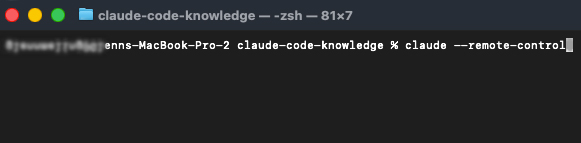
Command: claude --remote-control
Claude gives you a link and a QR code (a square barcode you scan with your phone camera). Open the link at claude.ai/code, or scan the QR code with the Claude app on iPhone or Android. From that moment, you can read the conversation and send messages from both devices at the same time.
The key thing to understand
Remote Control does not move anything to the cloud. Your computer is still doing all the work. Your phone is just a window into it. This means Claude has access to all your local files and projects. The phone is genuinely just a remote.
What this looks like in practice
You ask Claude to organize your photo library and head to the kitchen to make dinner. Claude has a question halfway through. You see the message on your phone and answer it without going back to your desk. That's it.
Or: you started a big task at work and you're on the couch. You want to check the progress. You open the session on your phone. Done.
Limitations
Your computer must stay on and Claude Code must keep running. Close the terminal window and the session ends. The connection also requires internet access. If your computer loses its network connection for around ten minutes, the session terminates.
Channels: let Telegram and Discord talk to Claude directly
What it is
Channels is a newer feature, released in version 2.1.80 of Claude Code in early 2026 as a "research preview" (an early test version that may still change). It lets external services push messages into a running Claude Code session.
This is different from Remote Control. Remote Control lets you reach Claude from somewhere else. Channels lets other systems send messages to Claude — things like Telegram bots (automated Telegram accounts), Discord servers, or webhooks (automatic notifications that a system sends when something happens, like a door alarm that triggers when someone opens the door).
The mailbox analogy
Remote Control is walking over to your assistant and giving instructions in person. Channels is leaving a note in the mailbox. The assistant checks the mailbox, reads the note, and acts on it — without you being there at all.
Two types of channels
| Type | How it works | Example |
|---|---|---|
| Two-way | Claude reads the message and responds back | You send "what's on my calendar tomorrow?" in Telegram. Claude checks your calendar file and replies with the answer |
| One-way | Claude reads the message and acts, but doesn't reply | An automated alert says something went wrong. Claude investigates and fixes it without saying anything |
What this looks like in practice
You're on a bus. You open Telegram and send a message to your Claude bot: "Draft an email to my landlord about the broken water heater." Claude writes it and saves it for you.
Not a developer? Same idea: "Make a shopping list based on the recipes I put in my meal-plan folder." Claude reads the folder and creates the list.
For developers, Channels opens up things like automated code review when someone proposes a code change, or automatic investigation when a monitoring service flags that a website has gone down.
Security
You control exactly who can send messages. Channels uses an allowlist (a list of approved senders; everyone else is ignored). Each new sender has to be paired with a code, similar to pairing a Bluetooth speaker for the first time.
Status
Channels currently supports Telegram and Discord. You can also build custom channels if you want to connect other services. It is still a research preview, so the feature may evolve.
Dispatch: text your assistant from your phone
What it is
Dispatch is a persistent conversation with Claude that lives in the Cowork tab of the Claude Desktop app. You open the Claude app on your phone, type a task, and Dispatch figures out how to handle it. If the task involves code or files, it automatically creates a Claude Code session on your computer.
The text message analogy
Remote Control is picking up the phone and steering something that's already running. Dispatch is sending a text message to your assistant who's sitting at the office. You don't need to start anything first. Just send the task and Dispatch takes care of the rest.
How it works
You pair the Claude mobile app (iPhone or Android) with Claude Desktop on your computer. Once paired, you can send messages from your phone at any time. Dispatch reads the task and decides what to do with it. Tasks like "fix the login bug" or "run the tests and fix anything that fails" get routed to a Claude Code session. Research or document tasks stay in Cowork.
When the Code session finishes or needs your approval, you get a push notification on your phone. The session shows up in the Desktop app's sidebar with a Dispatch badge, so you can review the results when you're back at your computer.
How it's different from Remote Control
Remote Control lets you steer a session you already started. Dispatch lets you start new work from scratch without touching your computer at all. You don't need to open a terminal first or type claude --remote-control. You just send a message from your phone and Dispatch handles the rest.
Limitation
Dispatch requires a Pro or Max plan and is not available on Team or Enterprise plans. Your computer and the Desktop app must be running for Dispatch to create Code sessions.
Scheduled Tasks: the alarm clock for your AI
What it is
Scheduled Tasks let you set up things Claude should do automatically at specific times or at regular intervals. Claude runs them without anyone asking.
The alarm clock
You set the alarm, walk away, and Claude wakes up at the right moment and does the thing. You don't have to be there.
Two ways to use it
In the terminal, using /loop: good for quick, short-lived checks.
/loop 5m check if the website is up and tell me if it's down
The 5m means every five minutes. This task lives only as long as the terminal window stays open.
In the Claude Desktop app: good for recurring tasks you want to keep permanently. You set up a task with a name, a description of what Claude should do, and a schedule (daily at 7am, every Sunday, etc.). These survive closing and reopening the app, and run automatically the next time the app is open.
What this looks like in practice
Every morning at 7:00, a Scheduled Task runs. Claude pulls news from the sources you've chosen, writes a short summary, and saves it to a file. Or sends it to you in Telegram (combined with Channels). You read it with your coffee. You didn't ask for it this morning. You set it up once and it just runs.
Other examples: a weekly spending summary based on your transactions, a daily reminder of tomorrow's calendar appointments, a monthly check on subscriptions you might no longer be using.
Limitation
The terminal version (/loop) disappears when you close the window. The Desktop app version is more permanent but still requires the app to be open and the computer to be awake when the task is scheduled to run.
Cowork: the dishwasher for your AI work
What it is
Cowork is the most autonomous of the four. You give Claude a task, it runs completely in the cloud (on Anthropic's own computers, not yours), and you can close your laptop and walk away. Hours later, you come back and the work is done.
The dishwasher analogy
You press start, go do something else, and come back to clean dishes. You didn't stand there and watch. You didn't check in halfway through. You just set it going and trusted it.
How it's different from Remote Control
This is worth a direct comparison, because the two can sound similar:
| Remote Control | Cowork | |
|---|---|---|
| Where does Claude run? | On your machine | In the cloud (Anthropic's servers) |
| Can you close your laptop? | No | Yes |
| Does Claude have access to all your files? | Yes, everything local | No, only what's in a Git repo |
| Is it interactive? | Yes, you guide it along the way | You give the task and wait |
A Git repo (short for repository) is a folder where code or project files are stored and tracked, often synced to a service like GitHub. Cowork works with these cloud-synced projects, which is why it doesn't need your laptop to stay on.
What this looks like in practice
You point Cowork at a project, describe what you want done, and let it run. For large tasks that would take hours of back-and-forth in a regular session, Cowork just handles it in one go while you're away.
For developers: large rewrites of code, running a full test suite (a collection of automated tests that check whether software works correctly) and fixing anything that fails, migrating a project to a new version of a framework.
For everyone else: "go through all the PDFs in this folder and summarize what each one covers," or "convert all my Word documents to a different format."
How the five features work together
These are not five competing tools. They complete each other. Here's what a combined day looks like:
A normal Tuesday
| Time | What happens |
|---|---|
| 7:00 am | Your Scheduled Task fires automatically. Claude fetches news from the sources you chose, writes a summary, and sends it to your Telegram via Channels. You read it while your coffee brews. |
| 9:00 am | You kick off a big job in Cowork: "go through all the receipts in my email from last year and give me a categorized summary." Claude starts working in the cloud while you do other things. |
| 11:00 am | You're out running errands. A Channels message arrives in Telegram from Claude: "I found 247 receipts. 34 of them are for the same subscription service you don't appear to be using. Want details?" You reply "yes, show me" from your phone. |
| 12:30 pm | On the bus home, you remember a bug a friend mentioned in your website. You open the Claude app on your phone and send a Dispatch message: "Fix the broken contact form on my website." Your Desktop at home picks it up and starts a Code session. You put your phone away. |
| 1:00 pm | You're at a coffee shop and want to check how the earlier photo organization is going. You open Remote Control on your phone and see Claude is almost done. It has a question about duplicate files. You answer from the phone. |
| 2:00 pm | An automated alert comes through Channels: your website has a different problem. Claude reads it, investigates, and fixes it. You're still at the coffee shop. |
| 3:00 pm | A push notification arrives: the Dispatch session finished fixing the contact form. You'll review it later. |
| 5:00 pm | You're home. Cowork has finished the receipts job. The Dispatch fix is waiting for review. You open your laptop and find everything organized and ready. No manual work. |
The shift this represents
Using AI means sitting at a screen, typing back and forth. Having AI work for you means giving a task, going on with your day, and checking the result when it suits you. That's a real difference, and these five features make it possible.
The five features represent five levels of freedom:
- Remote Control: you don't have to sit at your computer
- Channels: the outside world can talk to Claude without you
- Dispatch: you can start new work from your phone without touching your computer
- Scheduled Tasks: Claude does things without anyone asking
- Cowork: Claude works independently of your machine entirely
Taken together, they represent a shift from AI as a tool you use to AI as a worker that handles things. The transition happened fast. All of this launched in March 2026. Before that, none of it was possible. Let that sink in!
Glossary
| Term | Definition |
|---|---|
| Claude Code | The most capable version of Claude, which can read files, edit documents, and run programs directly on your computer or in the cloud |
| Terminal | The text-based window on your computer where you type commands instead of clicking. Think of it as talking to your computer with words rather than buttons |
| CLI (command-line interface) | Another name for the terminal, or software you control by typing text commands |
| QR code | A square barcode you scan with your phone camera to open a link instantly |
| Remote Control | A Claude Code feature that lets you control a session running on your computer from another device, like your phone |
| Channels | A Claude Code feature that lets external services (Telegram, Discord, webhooks) push messages into a running session |
| Webhook | An automatic notification a system sends when something happens, like a push notification for machines |
| Allowlist | A list of approved senders. Anyone not on the list is ignored |
| Dispatch | A feature in the Claude Desktop app that lets you send tasks from your phone. Dispatch decides how to handle them and can start Claude Code sessions on your computer |
| Scheduled Tasks | A Claude Code feature for setting up things Claude does automatically at set times or intervals |
| Cowork | A Claude Code feature where Claude works fully autonomously in the cloud, so you can close your laptop |
| Research preview | An early version of a feature that is live and usable but may still change |
| Git repo | A folder where files or code are tracked and version-controlled, often synced to a service like GitHub |
| Cloud | Computers owned and operated by a company (in this case, Anthropic) that do work on your behalf over the internet |
Sources and resources
- Claude Code Overview — Official Claude Code documentation
- Remote Control — Documentation for controlling Claude from another device
- Channels — Documentation for Telegram, Discord, and webhook integrations
- Channels Reference — Technical reference for building custom channels
- Dispatch — Setup, pairing, and Dispatch settings
- Scheduled Tasks (Terminal) — Timed and recurring tasks in the terminal
- Scheduled Tasks (Desktop) — Persistent scheduled tasks in the Desktop app
- Claude Code Desktop — Desktop app documentation, including Cowork and Dispatch
- Claude Code on the Web — Cloud-based Claude Code documentation
- Platforms and Integrations — Overview of all platforms and remote access options
- Changelog — Version history and release notes
- Security — Security model and permissions